Your Data Stays Yours.
QR Code Time Clock for Small Business — Private, Offline-First, Free.
Unlike Buddy Punch, Deputy, or QuickBooks Time, QRPunch stores every clock-in, every attendance record, and every employee's name on your computer — not on someone else's server.
Works when the internet goes down. Flat-rate pricing. Free forever for up to 5 employees.
*All plans: QR scanning and data viewing work offline. Paid plans: email+password admin sign-in works offline for 30 days. Google/Microsoft OAuth requires internet.
Up and running in under 15 minutes
No IT department needed. No cloud setup. Just install, add your employees, and start tracking.
Add your employees
Enter each employee's name and QRPunch generates a unique SecurePunch code — an encrypted QR that refreshes every 3 seconds on their phone, making screenshots and buddy punching impossible. Prefer physical cards? Basic QR cards can be printed and laminated as an alternative.
Set up a scan station
Any Windows PC with a webcam becomes a clock-in terminal. Employees hold their phone (or printed card) to the camera — clocked in under 1 second, no touch required.
Review & export
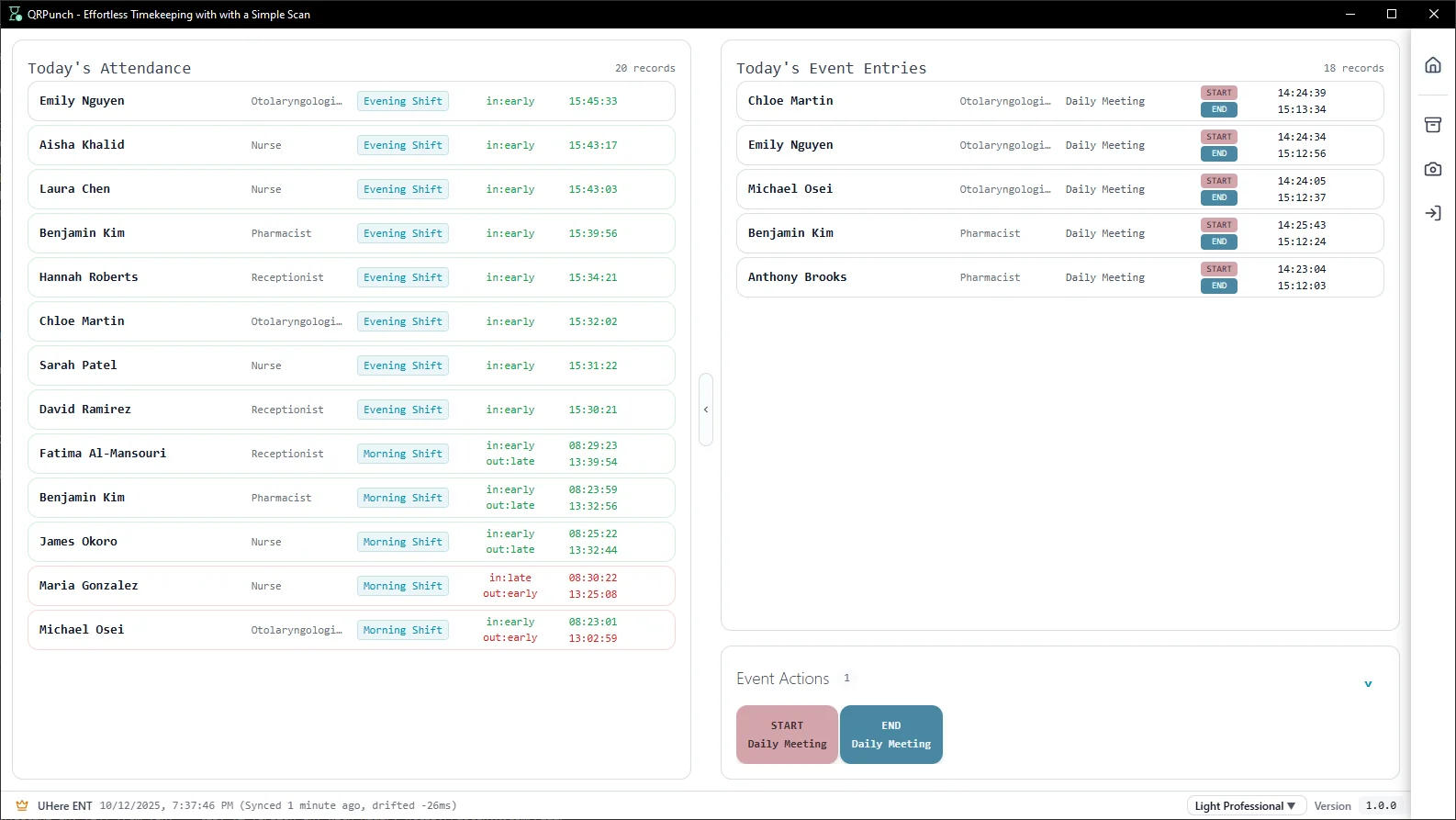
See who's in and who's out in real time. On Pro and Enterprise plans, export attendance records to Excel or CSV for payroll with one click — no chasing down a cloud dashboard.
Cloud SaaS stores your employees' data on their servers.
We don't.
Three things that set QRPunch apart from every cloud time-tracking tool on the market.
Your employees' data stays on your computer
Every name, email, and punch record is stored in a local database on your machine — never on our servers. Enterprise plan adds 256-bit AES database encryption with OS-level key storage for maximum security. Every plan benefits from complete data ownership and zero cloud exposure.
Ideal for healthcare, care homes, and any regulated industry
Works when the internet goes down
Job sites lose signal. Cafés have dead spots. Your time tracking shouldn't fail when your router does. QR scanning and attendance recording work offline on every plan — employees keep clocking in, records keep saving. On Pro and Enterprise plans, admins using email+password can also sign in offline for up to 30 days. (Google and Microsoft OAuth sign-in require an internet connection.)
Essential for construction, care homes, retail back-offices
Audit-ready records for labor compliance
Every clock-in, every manual edit, and every deletion is logged with who did it, when, and why. If you're ever audited for labor compliance, you have a complete, immutable paper trail. No cloud tool can give you this level of local control.
Available on Enterprise plan
Trusted by small businesses across industries

"No more chasing down lost paper sheets or manually updating spreadsheets. Staff scan a QR code when they walk in, and I get a clean Excel export for payroll at the end of the month. It's simple and it works."

"...Now my employees just scan their QR cards when they clock in and out - takes like 2 seconds and no more fudging times or buddy punching. I'm not a tech person at all but the interface is really straightforward..."

"...(translated) This feature is really practical and completely solves the previous problem. Scan it at the computer camera to complete the check-in, which is really fast..."
Reviews from Microsoft Store — verified purchases
One flat price. No per-employee fees.
Upgrade only when your team grows.
Unlike cloud competitors charging $5–8 per employee per month, QRPunch uses flat-rate tiers. A team of 20 costs the same whether you have 6 or 20 employees.
Free Starter
Up to 5 employees
Free forever, no trial period
Pro
Up to 20 employees
Or $190/year — save 16%
Enterprise
Up to 50 employees
Or $490/year — save 16%
Before you download
What if my computer crashes or dies? Is all my data lost?
No. QRPunch stores your database as a single portable file — back it up to a USB drive, an external hard drive, or a network share on your premises and you can restore everything on a new machine in minutes. Pro and Enterprise plans include automated daily backups to a path you choose. A note on cloud storage: services like Dropbox, Google Drive, or OneDrive are convenient, but they would upload your employee records to a third-party server — which is exactly what QRPunch is designed to avoid, and may be a compliance concern in regulated industries. If you want the convenience of offsite backup without the privacy trade-off, the Enterprise plan produces encrypted backups: the file is 256-bit AES encrypted before it's written, so even if it lands in the cloud, the contents are unreadable without your key.
How do employees get their QR codes?
QRPunch generates a printable QR card for each employee when you add them. Print and laminate them, or employees can use the free SecurePunch mobile app to display their QR code on their phone — no physical card needed.
Can I run more than one scan station at the same time?
Yes. You can install QRPunch on multiple Windows PCs and each one stores attendance records locally. If you need records consolidated across stations, get in touch — multi-station sync is on our roadmap.
Does it work on Mac or Linux?
Currently Windows 10 and 11 only, available through the Microsoft Store. Mac support is planned for a future release.
What happens when I exceed 5 employees on the Free plan?
QRPunch will prompt you to upgrade before you can add a 6th employee. All your existing records stay intact — you just choose a paid plan when your team grows.
Do I need the internet to use QRPunch day-to-day?
QR scanning, attendance recording, and data viewing all work fully offline on every plan. An internet connection is needed for: initial installation, SecurePunch card distribution to employees, and admin sign-in. Pro and Enterprise plans support offline admin sign-in for up to 30 days — but only when using email+password. Google and Microsoft OAuth sign-in always require an internet connection. Reconnect each billing cycle to revalidate your subscription.